Write a register expression
This guide shows how to write an expression that calculates or combines register values.
Steps
Click Register Settings in the toolbar.
In the row you want to edit, click the
...button in the Expression column to open the Compose expression window.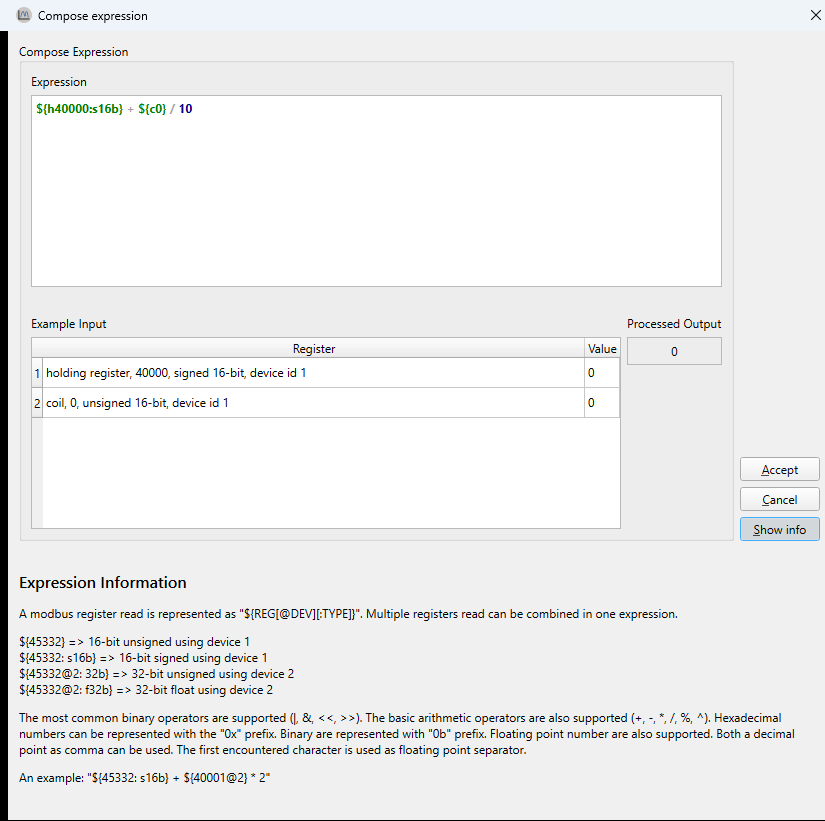
Type your expression in the input field. You can reference registers with
${ADDRESS}and combine them using operators.Examples:
Convert a raw value to amps:
${40001: s16b} * 0.1Combine voltage and current into power:
${40001} * ${40002@2}Extract the high byte of a register:
(${40001} >> 8) & 0xFF
Use the Example input table to enter test values and verify the result. The output updates as you type.
When the expression field turns green, the syntax is valid.
Click OK to apply.
Result: The register row uses the expression. The graph shows the calculated value instead of the raw register value.
Error handling
If the expression or a test input produces an invalid result (such as division by zero or an invalid register read), the output field shows an error message instead of a value. Correct the expression before applying.