Write an expression
This guide shows how to write an expression that calculates or combines data point values.
Steps
Click Signals in the toolbar.
In the row you want to edit, click the
...button in the Expression column to open the Compose expression window.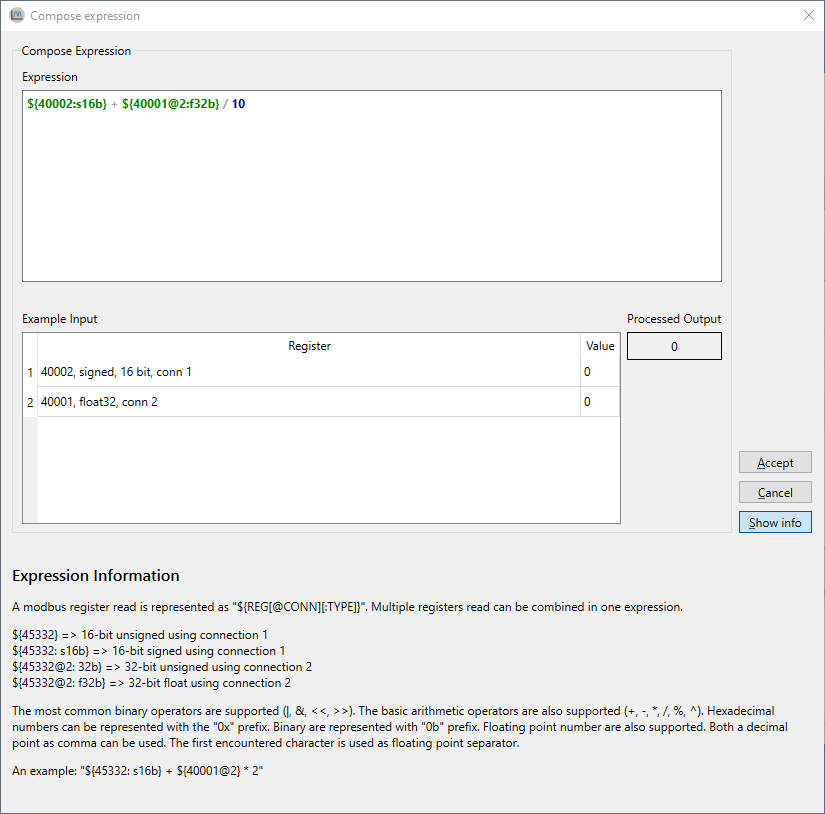
Type your expression in the input field. You can reference data points with
${ADDRESS}and combine them using operators.Examples:
Convert a raw value to amps:
${40001: s16b} * 0.1Combine voltage and current into power:
${40001} * ${40002@2}Extract the high byte of a data point:
(${40001} >> 8) & 0xFF
Use the Example Input table to enter test values and verify the result. The output updates as you type.
When the expression field turns green, the syntax is valid.
Click Accept to apply.
Result: The signal uses the expression. The graph shows the calculated value instead of the raw data point value.
Error handling
If the expression or a test input produces an invalid result (such as division by zero or an invalid data point read), the output field shows an error message instead of a value. Correct the expression before applying.